library(mgvc)Error in `library()`:
! there is no package called 'mgvc'PLS 206 — Friday hands-on session
This is a do-it-yourself session. You start from an empty R script and finish with a fitted GAM, a fitted growth curve with meaningful parameters, and a figure you could put in a paper. No step assumes you already know how to code. Every step has the same five parts: what we are doing and why, the code, a Checkpoint (what you should see), the error people hit most often at that step and what it means, and a small Now you try. The lecture code for the week is a separate page: the week’s lecture code.
Type the code yourself rather than copying it: typing is how the commands stick. If you get lost, the finished script is Week4_friday_practice.R. The Now you try answers are folded on this page and left out of the script.
The data. Sunflowers grown in pots, two varieties (giant and dwarf). Every 7 days, from day 7 to day 84, five plants of each variety were harvested and their shoots dried and weighed, so every row is a different plant. sunflower_growth.csv has four columns: plant (an ID, 1-120), variety, day (days after sowing), and mass_g (shoot dry mass, g). The data are simulated for practice.
What and why. We write code in a script, not in the console, so that everything we do is saved and can be run again tomorrow.
In RStudio: File > New File > R Script, then File > Save and call it sunflower.R. Type the line below into the script (the top-left pane), put your cursor on it, and press Ctrl + Enter (Windows) or Cmd + Enter (Mac). That sends the line to the console (the bottom-left pane) and runs it.
1 + 1[1] 2Checkpoint. The console prints [1] 2. The [1] just means “first value of the answer”.
If you see this. The console shows + instead of > and nothing happens, whatever you type. R thinks your line is unfinished, almost always because a bracket ( or a quote " was opened and never closed. Click in the console and press Esc to get the > back, then fix the line in your script.
Now you try. Run a line that adds up 120 and 70 (the rough final mass, in grams, of a giant and a dwarf sunflower).
120 + 70[1] 190What and why. A package is a toolbox someone else wrote; ggplot2 draws figures and mgcv fits GAMs, and library() opens each toolbox for this session.
# install.packages(c("ggplot2", "mgcv"))
library(ggplot2)
library(mgcv)
Loading required package: nlmeThis is mgcv 1.9-4. For overview type '?mgcv'.Checkpoint. mgcv prints two lines: Loading required package: nlme and This is mgcv .... That is a normal startup message, not an error. Red text that starts with Error is an error; red text without it usually is not.
If you see this error. there is no package called ... means R cannot find that toolbox: either the name is misspelled (for example library(mgvc)), or the package was never installed on your computer. If it is not installed, run install.packages("mgcv") once, in the console. Never leave install.packages() switched on in a script: it would reinstall every time you run the script. That is why the line above starts with #, which turns it into a comment.
library(mgvc)Error in `library()`:
! there is no package called 'mgvc'Now you try. Load the splines package (it comes with R, so there is nothing to install).
library(splines)What and why. read.csv() reads the table straight from the course website into an object we name sun; str() and head() show us what we got before we trust it.
sun <- read.csv("https://greymonroe.github.io/PLS_206/data/sunflower_growth.csv")str(sun)'data.frame': 120 obs. of 4 variables:
$ plant : int 1 2 3 4 5 6 7 8 9 10 ...
$ variety: chr "dwarf" "dwarf" "dwarf" "dwarf" ...
$ day : int 7 7 7 7 7 7 7 7 7 7 ...
$ mass_g : num 0.7 0.7 0.6 0.7 0.7 0.9 1 1.1 0.9 1.1 ...head(sun) plant variety day mass_g
1 1 dwarf 7 0.7
2 2 dwarf 7 0.7
3 3 dwarf 7 0.6
4 4 dwarf 7 0.7
5 5 dwarf 7 0.7
6 6 giant 7 0.9<- means “store the thing on the right under the name on the left”. str() lists every column with its type: int (whole numbers), chr (text), num (numbers with decimals).
Checkpoint. str(sun) says 'data.frame': 120 obs. of 4 variables, and you see sun in the Environment pane (top right).
If you see these errors. object 'Sun' not found: R is case-sensitive, so Sun and sun are different names. cannot open the connection, with a warning that says HTTP status was '404 Not Found': there is no file at that web address, almost always a typo (for example sunflower_grwoth.csv). Copy the address again rather than retyping it.
str(Sun)Error:
! object 'Sun' not foundsun_typo <- read.csv("https://greymonroe.github.io/PLS_206/data/sunflower_grwoth.csv")Warning in file(file, "rt"): cannot open URL
'https://greymonroe.github.io/PLS_206/data/sunflower_grwoth.csv': HTTP status
was '404 Not Found'Error in `file()`:
! cannot open the connection to 'https://greymonroe.github.io/PLS_206/data/sunflower_grwoth.csv'Now you try. How many plants of each variety were harvested on each day? Use table() on the two columns sun$variety and sun$day (the $ pulls one column out of a table).
table(sun$variety, sun$day) # 5 plants per variety per harvest, 12 harvests
        7 14 21 28 35 42 49 56 63 70 77 84
  dwarf 5  5  5  5  5  5  5  5  5  5  5  5
giant 5 5 5 5 5 5 5 5 5 5 5 5What and why. We fit one variety at a time, so we make a smaller table with only the giant plants.
giant <- subset(sun, variety == "giant")
nrow(giant)
[1] 60== asks a question (“is the variety equal to giant?”) and keeps the rows where the answer is yes.
Checkpoint. nrow(giant) is 60: 5 plants x 12 harvests.
If you see this warning. One = instead of two. = sets a value; == compares. With one = R ignores the condition, warns you, and hands back all 120 rows. This one does not stop your code, which makes it dangerous: always check nrow().
oops <- subset(sun, variety = "giant")Warning: In subset.data.frame(sun, variety = "giant") :
extra argument 'variety' will be disregardednrow(oops)[1] 120Now you try. Make a table called dwarf with only the dwarf plants and check its number of rows.
dwarf <- subset(sun, variety == "dwarf")
nrow(dwarf)   # 60
[1] 60What and why. Always look at the data before fitting anything: the picture tells you which model shape to try.
ggplot(giant, aes(x = day, y = mass_g)) +
  geom_point() +
  theme_classic()
ggplot() names the table and which column goes on each axis; each + adds a layer: geom_point() draws the points, theme_classic() makes it plain.
Checkpoint. An S-shaped cloud: almost nothing for the first three weeks, a steep rise between about day 30 and day 60, and a levelling-off near 115-120 g. A straight line cannot follow that.
If you see this error. Cannot use + with a single argument. Did you accidentally put + on a new line?: the + is at the start of a line instead of the end of the line before. R ran the first line as a finished plot (an empty one, with axes and no points) and then did not know what + geom_point() on its own meant. Put every + at the end of a line.
ggplot(giant, aes(x = day, y = mass_g))
+ geom_point()Error:
! Cannot use `+` with a single argument.
ℹ Did you accidentally put `+` on a new line?Now you try. Plot the dwarf plants the same way. Change one thing: the table name.
ggplot(dwarf, aes(x = day, y = mass_g)) +
  geom_point() +
  theme_classic()
What and why. We fit the straight line first, because the way it misses tells us what shape we need.
m_line <- lm(mass_g ~ day, data = giant)
summary(m_line)$r.squared
[1] 0.8754919Read mass_g ~ day as “mass, explained by day”. Plot the data, the fitted line and its 95% confidence band:
ggplot(giant, aes(x = day, y = mass_g)) +
  geom_point() +
  geom_smooth(method = "lm", formula = y ~ x) +
  theme_classic()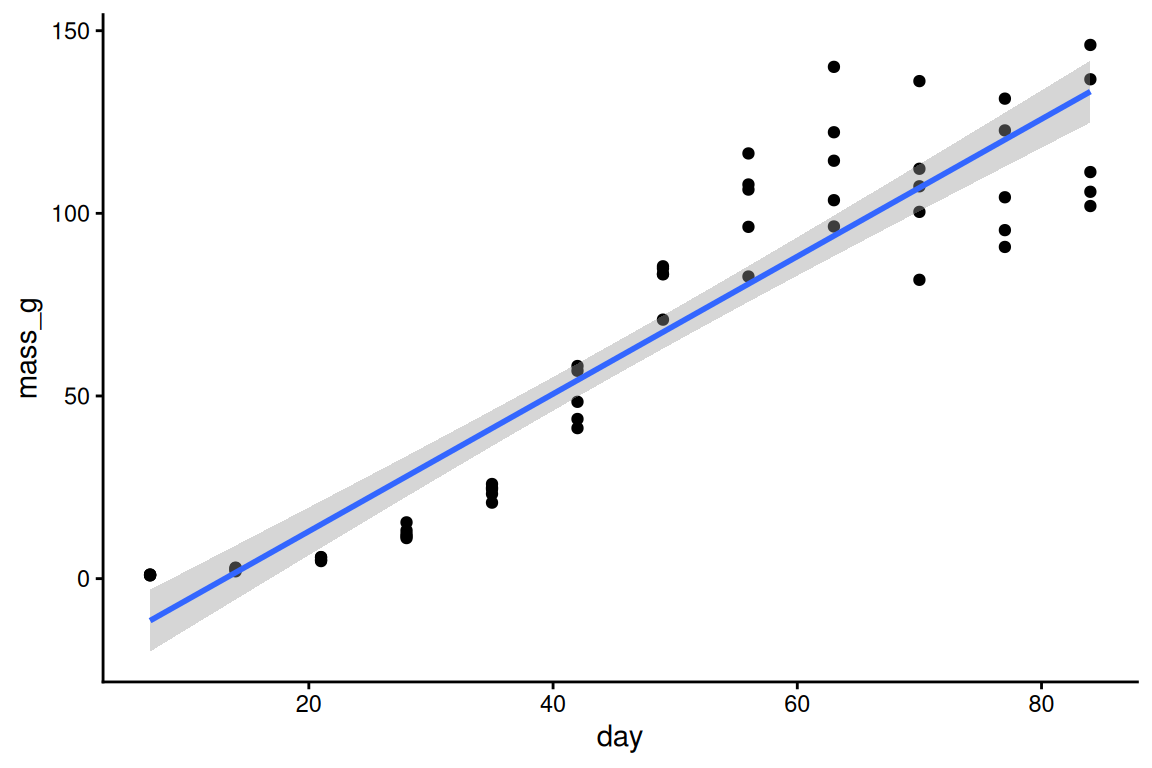
A residual is how far each plant sits from the line (observed minus fitted). If the line had the right shape, the residuals would be a shapeless cloud around zero:
plot(fitted(m_line), resid(m_line), xlab = "Fitted mass (g)", ylab = "Residual (g)")
abline(h = 0, lty = 2)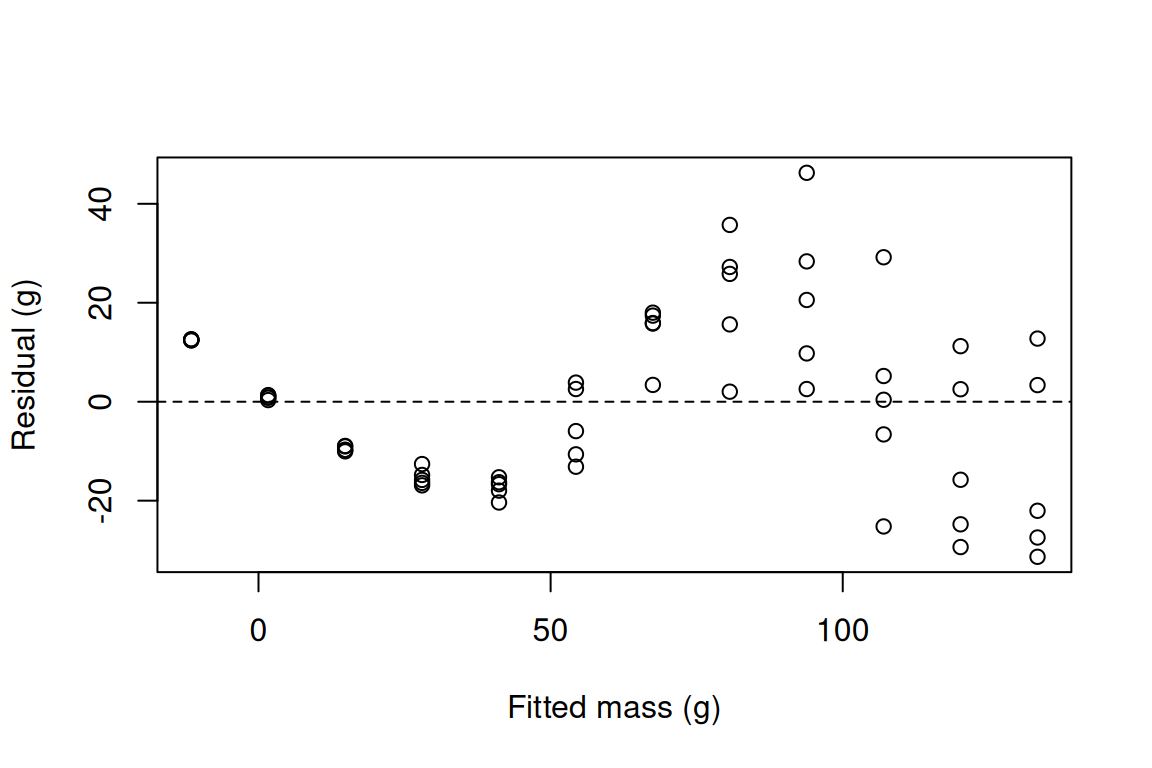
Checkpoint. R² is 0.875, which sounds great, but the residuals make a wave: above zero, then below, then above, then below again. The line starts too low (it even predicts negative mass for the first harvests), runs too high before the growth spurt, too low during it, and too high once the plants level off. A high R² does not mean the shape is right; the residual plot does.
No error at this step, but a trap. Reading R² and stopping. Look at the residual plot every time.
Now you try. Fit the straight line to the dwarf plants and draw its residual plot. Do you see the same wave?
m_line_d <- lm(mass_g ~ day, data = dwarf)
summary(m_line_d)$r.squared   # 0.887
[1] 0.886504plot(fitted(m_line_d), resid(m_line_d), xlab = "Fitted mass (g)", ylab = "Residual (g)")
abline(h = 0, lty = 2) # the same wave
What and why. The trick from the lecture: make a new column, day², give it its own coefficient, and lm() can bend the line once.
m_quad <- lm(mass_g ~ day + I(day^2), data = giant)
summary(m_quad)$r.squared
[1] 0.8775776I() tells R “do this sum”: I(day^2) is day squared.
ggplot(giant, aes(x = day, y = mass_g)) +
  geom_point() +
  geom_smooth(method = "lm", formula = y ~ x + I(x^2)) +
  theme_classic()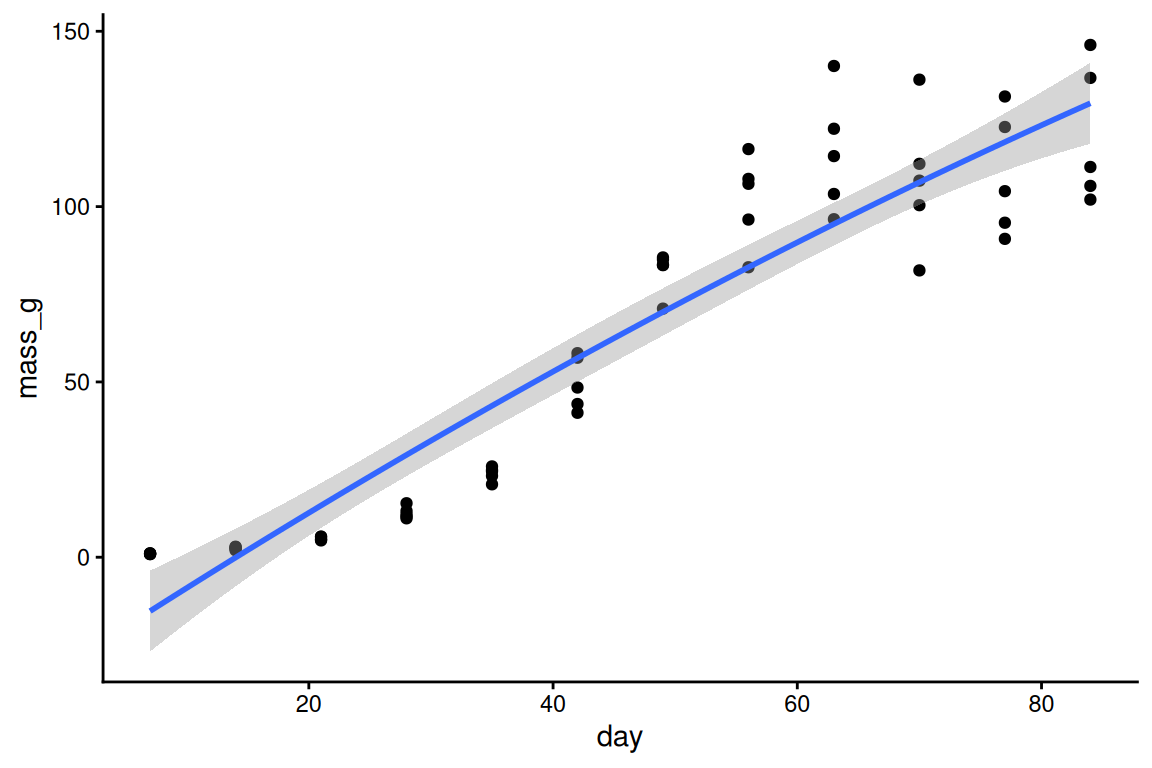
plot(fitted(m_quad), resid(m_quad), xlab = "Fitted mass (g)", ylab = "Residual (g)")
abline(h = 0, lty = 2)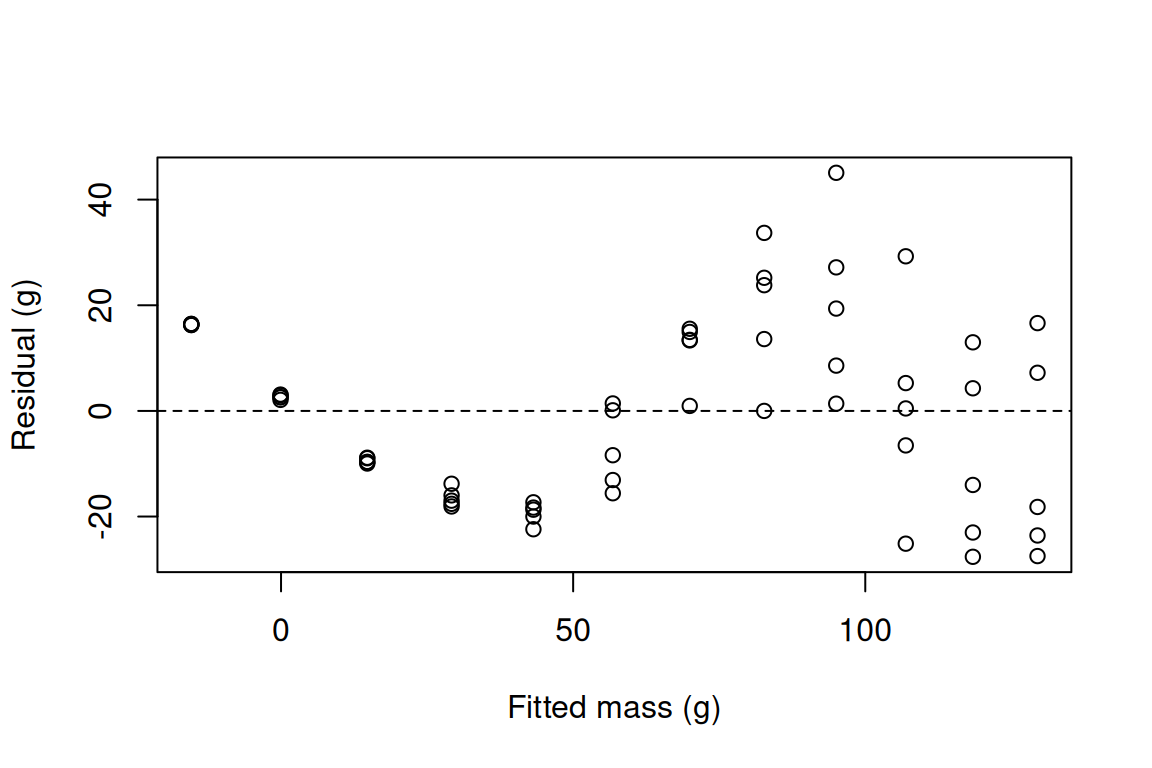
Checkpoint. R² barely moves (0.875 to 0.878) and the wave in the residuals is still there. A squared term makes one hill or one valley; an S bends twice, flat then steep then flat. We need something more flexible.
If you see this. You wrote day^2 without I(): inside a formula, ^ means something else (crossing terms), and R quietly fits the straight line again. Check that the output has an I(day^2) coefficient: coef(m_quad).
Now you try. Look at the coefficients of m_quad with coef(). Is the I(day^2) coefficient positive or negative, and what does that sign mean for the shape?
coef(m_quad) # negative: the parabola bends down, a hill, not an S (Intercept) day I(day^2)
-31.052727273 2.271745397 -0.004293258 What and why. s(day) builds many local bumps from day and a penalty keeps the curve only as wiggly as the data demand; method = "REML" is the recommended way to choose that wiggliness (mgcv’s default is a different method).
g <- gam(mass_g ~ s(day), data = giant, method = "REML")
summary(g)
Family: gaussian
Link function: identity

Formula:
mass_g ~ s(day)

Parametric coefficients:
            Estimate Std. Error t value Pr(>|t|)
(Intercept)   60.917      1.462   41.66   <2e-16 ***
---
Signif. codes:  0 '***' 0.001 '**' 0.01 '*' 0.05 '.' 0.1 ' ' 1

Approximate significance of smooth terms:
         edf Ref.df     F p-value
s(day) 5.841  7.001 149.4  <2e-16 ***
---
Signif. codes:  0 '***' 0.001 '**' 0.01 '*' 0.05 '.' 0.1 ' ' 1

R-sq.(adj) =  0.947   Deviance explained = 95.2%
-REML = 233.97  Scale est. = 128.28    n = 60
Reading the summary, line by line.
(Intercept), Estimate 60.917. The mean mass of the giant plants, mean(giant$mass_g). The smooth is centred on zero, so the intercept is the average.
edf 5.841. Effective degrees of freedom: how wiggly the curve is. 1 would be a straight line.
Ref.df 7.001, F 149.4, p-value <2e-16. The test of “is the curve flat?”. Flat is clearly rejected.
R-sq.(adj) 0.947. Like R² from lm(), adjusted for how flexible the curve is.
Deviance explained 95.2%. The share of the variation the curve accounts for.
-REML 233.97. The score REML minimised to choose the wiggliness; only useful for comparing fits of the same data.
Scale est. 128.28. The residual variance; its square root, 11.3 g, is the typical miss.
n 60. The number of plants used.
mean(giant$mass_g) # the same as the intercept[1] 60.91667sqrt(g$scale) # the typical miss, in g[1] 11.32596The quick look at the curve. plot() on a GAM draws the smooth centred at zero (add the intercept to get grams), with a shaded band of ±2 standard errors. The label on the y-axis, s(day,5.84), carries the edf:
plot(g, shade = TRUE, residuals = TRUE, pch = 1)
Checkpoint. edf is about 5.8, well above 1, so the curve really bends. The p-value is <2e-16 and deviance explained is 95.2%, up from 87.5% for the straight line.
If you see this error. could not find function "gam": mgcv is not loaded in this session (for example, you restarted RStudio). Run library(mgcv) again. The same goes for could not find function "s".
g <- gam(mass_g ~ s(day), data = giant, method = "REML")Error in `gam()`:
! could not find function "gam"Now you try. Fit the same GAM to the dwarf plants. What are its edf and deviance explained?
g_d <- gam(mass_g ~ s(day), data = dwarf, method = "REML")
summary(g_d)   # edf 5.93, deviance explained 96.9%
Family: gaussian
Link function: identity

Formula:
mass_g ~ s(day)

Parametric coefficients:
            Estimate Std. Error t value Pr(>|t|)
(Intercept)  40.0533     0.7022   57.04   <2e-16 ***
---
Signif. codes:  0 '***' 0.001 '**' 0.01 '*' 0.05 '.' 0.1 ' ' 1

Approximate significance of smooth terms:
         edf Ref.df     F p-value
s(day) 5.932  7.095 230.3  <2e-16 ***
---
Signif. codes:  0 '***' 0.001 '**' 0.01 '*' 0.05 '.' 0.1 ' ' 1

R-sq.(adj) =  0.965   Deviance explained = 96.9%
-REML = 191.62 Scale est. = 29.585 n = 60What and why. k is the ceiling on wiggliness, not the wiggliness itself; gam.check() asks whether the curve is pressing against that ceiling.
set.seed(206)   # the k-index p-value comes from a random shuffle
gam.check(g)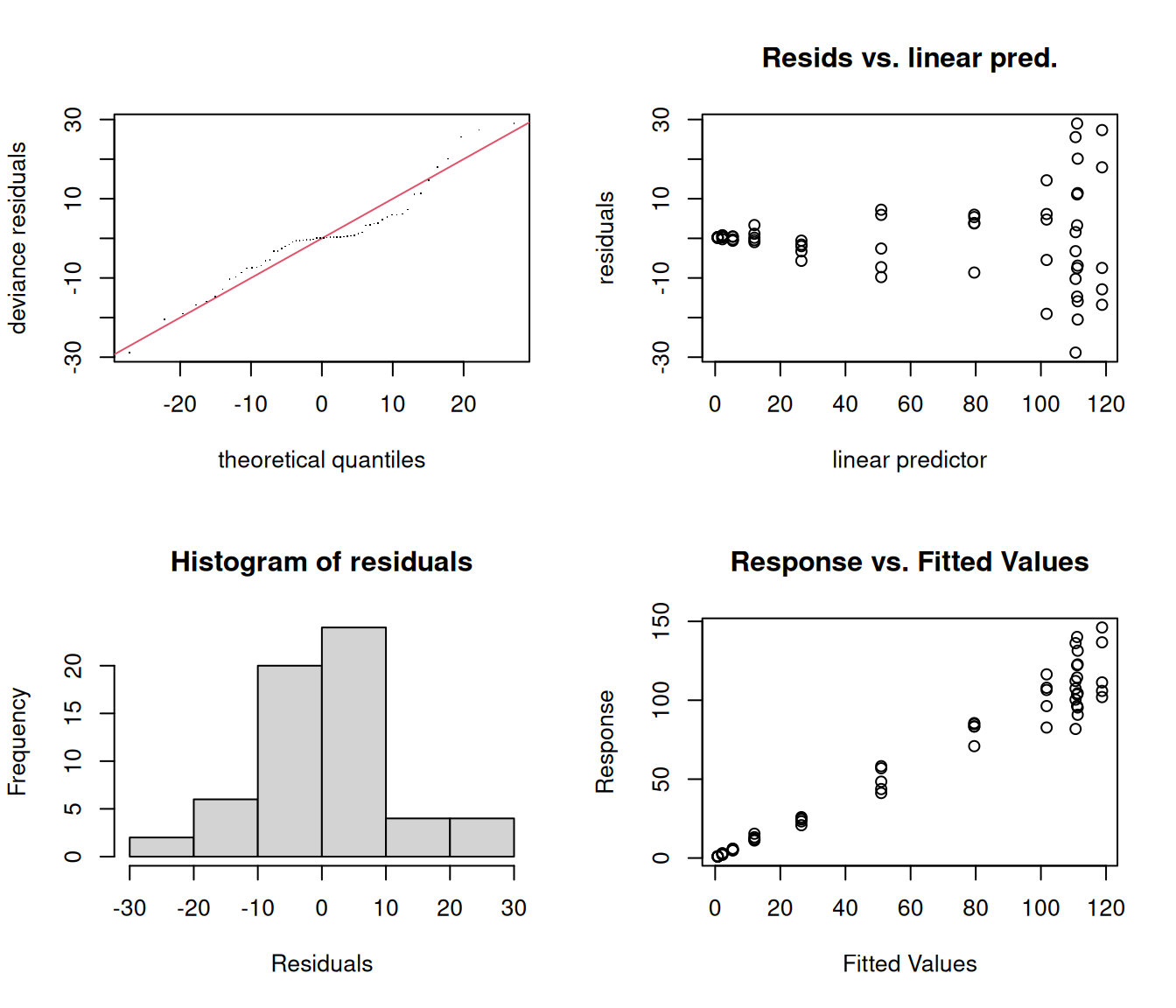
Method: REML   Optimizer: outer newton
full convergence after 3 iterations.
Gradient range [-0.0002214794,-3.52042e-06]
(score 233.9707 & scale 128.2773).
Hessian positive definite, eigenvalue range [1.965696,29.21691].
Model rank =  10 / 10

Basis dimension (k) checking results. Low p-value (k-index<1) may
indicate that k is too low, especially if edf is close to k'.

         k'  edf k-index p-value
s(day) 9.00 5.84    1.18    0.94
The four plots are the usual residual checks. The table at the bottom is the one to read: k' is the ceiling (k - 1 = 9 with the default k = 10), edf is what the curve used, and a k-index below 1 with a small p-value and an edf close to k' means “raise k”.
Checkpoint. k' 9.00, edf 5.84, k-index 1.18, p-value about 0.9 (yours may differ a little: it comes from a random shuffle). The curve uses about 6 of its 9 and the test is happy: k is fine. One thing the plots do flag: in Resids vs. linear pred. the scatter fans out, because big plants vary by more grams than seedlings do. We come back to that at the end of step 10.
The way to be sure: raise k and see whether the curve changes. Here k can be at most 12 (any more gives an error, shown at the end of this step), so try 12:
g12 <- gam(mass_g ~ s(day, k = 12), data = giant, method = "REML")
summary(g12)$edf
[1] 6.017749days <- data.frame(day = seq(7, 84, by = 0.5))
max(abs(predict(g12, days) - predict(g, days))) # biggest change anywhere, in g[1] 0.2900057The edf moves from 5.84 to 6.02 and the curve moves by at most 0.29 g, when plants typically miss it by 11 g. Nothing changed: the default was fine.
If you see this error. A term has fewer unique covariate combinations than specified maximum degrees of freedom: you asked for more bumps than there are distinct x values. There were only 12 harvest days, so k can be at most 12. Lower k.
gam(mass_g ~ s(day, k = 15), data = giant, method = "REML")Error in `smooth.construct.tp.smooth.spec()`:
! A term has fewer unique covariate combinations than specified maximum degrees of freedomNow you try. Run gam.check() on your dwarf GAM g_d. Is k big enough?
set.seed(206)
gam.check(g_d)   # k' 9, edf 5.93, k-index 1.09, p about 0.7: fine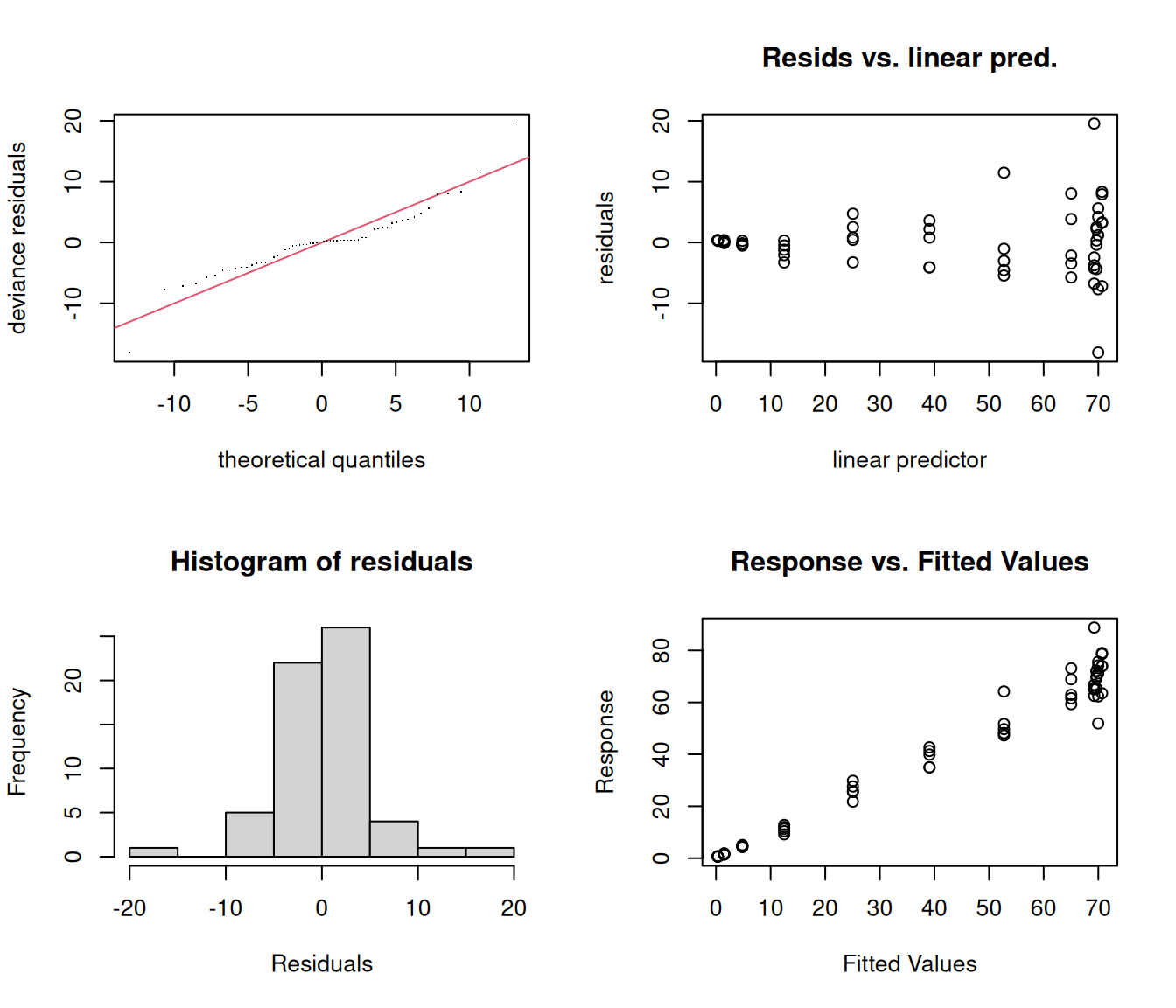
Method: REML   Optimizer: outer newton
full convergence after 5 iterations.
Gradient range [-2.01939e-05,1.462161e-05]
(score 191.6221 & scale 29.58502).
Hessian positive definite, eigenvalue range [1.967971,29.22499].
Model rank =  10 / 10

Basis dimension (k) checking results. Low p-value (k-index<1) may
indicate that k is too low, especially if edf is close to k'.

         k'  edf k-index p-value
s(day) 9.00 5.93 1.09 0.72What and why. The GAM describes the shape but has no parameter that means “final size”; a logistic growth model does, and nls() estimates it.
The logistic curve is
mass = Asym / (1 + exp((xmid - day) / scal))
Asym is the asymptote: the final mass the plants level off at (g).
xmid is the day the plants reach half their final mass.
scal is how slowly they rise (days): a bigger scal is a gentler S.
Unlike lm() and gam(), nls() needs starting values: a first guess for each parameter, which it then improves. Read them off your plot from step 4: the cloud levels off at about 120 g; half of that, 60 g, is reached around day 45; and the steep part takes about 30 days, so a scal between 5 and 10 (a quarter of that span, roughly) is a fine guess.
n1 <- nls(mass_g ~ Asym / (1 + exp((xmid - day) / scal)),
          data = giant,
          start = list(Asym = 120, xmid = 45, scal = 8))
summary(n1)
Formula: mass_g ~ Asym/(1 + exp((xmid - day)/scal))

Parameters:
     Estimate Std. Error t value Pr(>|t|)
Asym 115.0992     2.9310  39.270  < 2e-16 ***
xmid  43.3506     0.8737  49.617  < 2e-16 ***
scal   6.4399     0.7390   8.714 4.55e-12 ***
---
Signif. codes:  0 '***' 0.001 '**' 0.01 '*' 0.05 '.' 0.1 ' ' 1

Residual standard error: 11.31 on 57 degrees of freedom

Number of iterations to convergence: 5
Achieved convergence tolerance: 2.646e-06confint(n1) 2.5% 97.5%
Asym 109.491068 121.210742
xmid 41.645096 45.106494
scal 5.028994 8.090522confint() prints Waiting for profiling to be done... while it works; that is not an error.
Checkpoint. Asym about 115 g (95% CI 109.5 to 121.2), xmid about 43.4 days (41.6 to 45.1), scal about 6.4 days. In words: the giant plants level off at about 115 g and reach half of that on day 43.
R also has a self-starting version that finds its own starting values. The same model, the same answer:
n2 <- nls(mass_g ~ SSlogis(day, Asym, xmid, scal), data = giant)
coef(n2)
Asym xmid scal
115.099193 43.350644 6.439857 If you see this error. singular gradient: the starting values were so far off that nls() could not tell which way to move. For example, start = list(Asym = 120, xmid = 200, scal = 8) guesses the half-size day as day 200, long after the last harvest, so the curve is flat across all the data. Go back to the plot and read the starting values again (or use SSlogis).
nls(mass_g ~ Asym / (1 + exp((xmid - day) / scal)),
    data = giant,
    start = list(Asym = 120, xmid = 200, scal = 8))
Error in `nls()`:
! singular gradientNow you try. Fit the logistic curve to the dwarf plants. Read new starting values off your dwarf plot from step 4: only the numbers in start = list(...) change.
n1_d <- nls(mass_g ~ Asym / (1 + exp((xmid - day) / scal)),
            data = dwarf,
            start = list(Asym = 70, xmid = 40, scal = 7))
summary(n1_d)
Formula: mass_g ~ Asym/(1 + exp((xmid - day)/scal))

Parameters:
     Estimate Std. Error t value Pr(>|t|)
Asym  71.1058     1.4402   49.37   <2e-16 ***
xmid  40.1097     0.7604   52.75   <2e-16 ***
scal   7.3835     0.6406   11.53   <2e-16 ***
---
Signif. codes:  0 '***' 0.001 '**' 0.01 '*' 0.05 '.' 0.1 ' ' 1

Residual standard error: 5.553 on 57 degrees of freedom

Number of iterations to convergence: 5
Achieved convergence tolerance: 8.418e-06confint(n1_d) # Asym 71.1 g (68.4 to 74.0), xmid 40.1 days 2.5% 97.5%
Asym 68.366133 74.019442
xmid 38.608713 41.639797
scal 6.253513 8.655574What and why. A curve is reported as a picture: the raw data, the fitted curve and its 95% confidence band, with labelled axes and units.
First, predictions from the GAM on a fine grid of days, with standard errors. fit ± 1.96 × se is the 95% band:
days <- data.frame(day = seq(7, 84, by = 0.5))
pred <- predict(g, newdata = days, se.fit = TRUE)
days$gam_fit <- pred$fit
days$gam_lo <- pred$fit - 1.96 * pred$se.fit
days$gam_hi <- pred$fit + 1.96 * pred$se.fit
days$nls_fit <- predict(n1, newdata = days)
head(days)
day gam_fit gam_lo gam_hi nls_fit
1 7.0 0.7831104 -8.525497 10.091718 0.4056069
2 7.5 0.8620405 -7.887779 9.611860 0.4382290
3 8.0 0.9416889 -7.312712 9.196090 0.4734639
4 8.5 1.0227741 -6.809988 8.855536 0.5115192
5 9.0 1.1060143 -6.386756 8.598784 0.5526185
6 9.5 1.1921279 -6.046244 8.430500 0.5970028Now the figure, built one layer at a time and stored in an object called fig:
fig <- ggplot(giant, aes(x = day, y = mass_g)) +
  geom_ribbon(data = days, aes(x = day, ymin = gam_lo, ymax = gam_hi),
              inherit.aes = FALSE, fill = "grey80") +
  geom_point(shape = 21, fill = "goldenrod2", size = 2) +
  geom_line(data = days, aes(x = day, y = gam_fit), linewidth = 1) +
  geom_line(data = days, aes(x = day, y = nls_fit), colour = "firebrick", linetype = "dashed") +
  labs(x = "Days after sowing", y = "Shoot dry mass (g)") +
  theme_classic(base_size = 14)
fig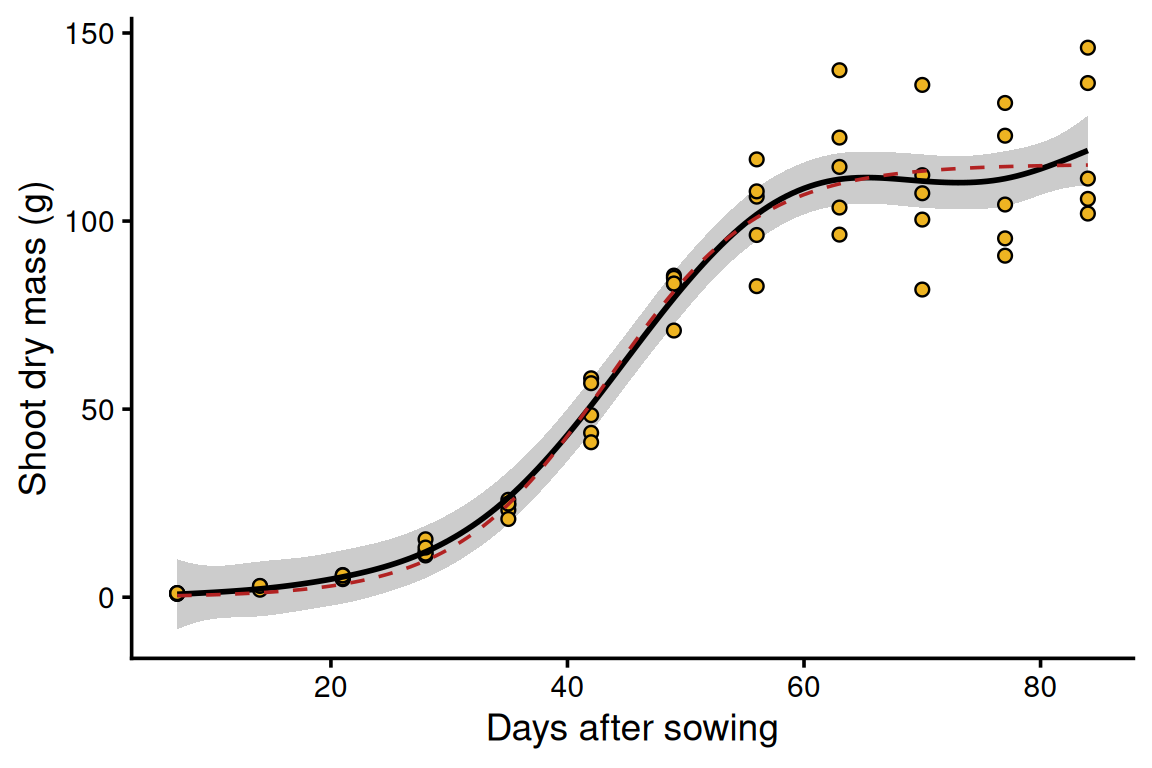
Black: the GAM with its 95% band (grey). Dashed red: the logistic curve from nls(). They lie almost on top of each other: two ways of describing the same growth, one by its shape, one by its parameters.
ggsave("sunflower.png", fig, width = 6, height = 4, dpi = 300)Checkpoint. A file called sunflower.png appears in the Files pane (bottom right), in the folder your script is saved in. Open it: 6 x 4 inches at 300 dpi, sharp enough for a journal.
If the wrong plot is saved. ggsave("sunflower.png") without a plot saves the last plot you displayed, which may not be the one you meant. Store the figure in an object (fig <- ...) and name it in ggsave(), as above.
The logistic curve can have a 95% band too. One way: draw 1000 sets of parameters from their estimated uncertainty, compute a curve for each, and keep the middle 95% at every day.
set.seed(1)
draws <- MASS::mvrnorm(1000, mu = coef(n1), Sigma = vcov(n1))
curves <- apply(draws, 1, function(p) p["Asym"] / (1 + exp((p["xmid"] - days$day) / p["scal"])))
days$nls_lo <- apply(curves, 1, quantile, probs = 0.025)
days$nls_hi <- apply(curves, 1, quantile, probs = 0.975)

ggplot(giant, aes(x = day, y = mass_g)) +
  geom_ribbon(data = days, aes(x = day, ymin = nls_lo, ymax = nls_hi),
              inherit.aes = FALSE, fill = "mistyrose") +
  geom_point(shape = 21, fill = "goldenrod2", size = 2) +
  geom_line(data = days, aes(x = day, y = nls_fit), colour = "firebrick", linewidth = 1) +
  labs(x = "Days after sowing", y = "Shoot dry mass (g)") +
  theme_classic(base_size = 14)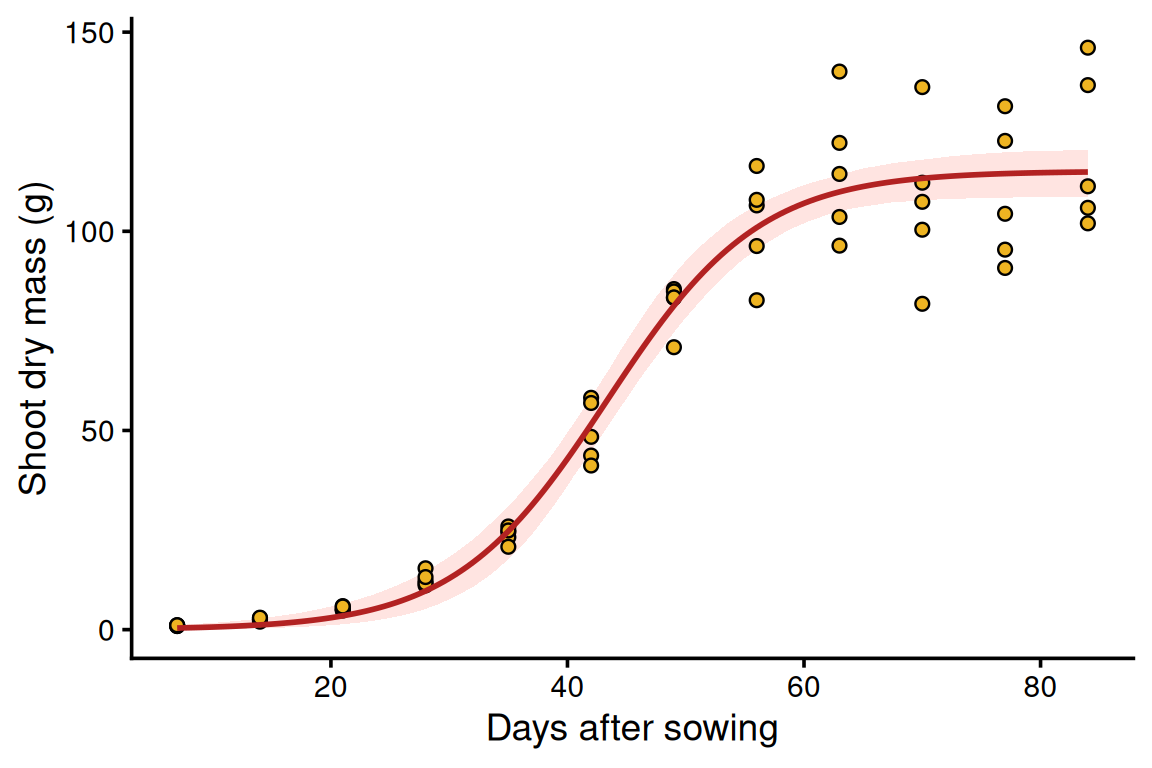
Going further: scatter that grows with size. The grey GAM band dips below zero for the first harvests, and the residuals fan out: a plain gam() assumes every plant scatters by the same number of grams, but seedlings vary by a fraction of a gram and big plants by tens of grams. The fix from the Week 3 GLM families page works here too: a Gamma family with a log link (family = Gamma(link = "log")), so the scatter grows with the mean and the curve can never go below zero. Predict on the log scale, build the band there, then back-transform with exp().
g_gamma <- gam(mass_g ~ s(day), family = Gamma(link = "log"), data = giant, method = "REML")
summary(g_gamma)   # edf 6.37, deviance explained 99.0%
Family: Gamma
Link function: log

Formula:
mass_g ~ s(day)

Parametric coefficients:
            Estimate Std. Error t value Pr(>|t|)
(Intercept)  3.34859    0.01736   192.9   <2e-16 ***
---
Signif. codes:  0 '***' 0.001 '**' 0.01 '*' 0.05 '.' 0.1 ' ' 1

Approximate significance of smooth terms:
         edf Ref.df    F p-value
s(day) 6.374  7.528 1141  <2e-16 ***
---
Signif. codes:  0 '***' 0.001 '**' 0.01 '*' 0.05 '.' 0.1 ' ' 1

R-sq.(adj) =  0.947   Deviance explained =   99%
-REML = 178.36  Scale est. = 0.018083  n = 60
pred_gamma <- predict(g_gamma, newdata = days, se.fit = TRUE) # on the log scale
days$gamma_fit <- exp(pred_gamma$fit)
days$gamma_lo <- exp(pred_gamma$fit - 1.96 * pred_gamma$se.fit)
days$gamma_hi <- exp(pred_gamma$fit + 1.96 * pred_gamma$se.fit)
ggplot(giant, aes(x = day, y = mass_g)) +
geom_ribbon(data = days, aes(x = day, ymin = gamma_lo, ymax = gamma_hi),
inherit.aes = FALSE, fill = "grey80") +
geom_point(shape = 21, fill = "goldenrod2", size = 2) +
geom_line(data = days, aes(x = day, y = gamma_fit), linewidth = 1) +
labs(x = "Days after sowing", y = "Shoot dry mass (g)") +
theme_classic(base_size = 14)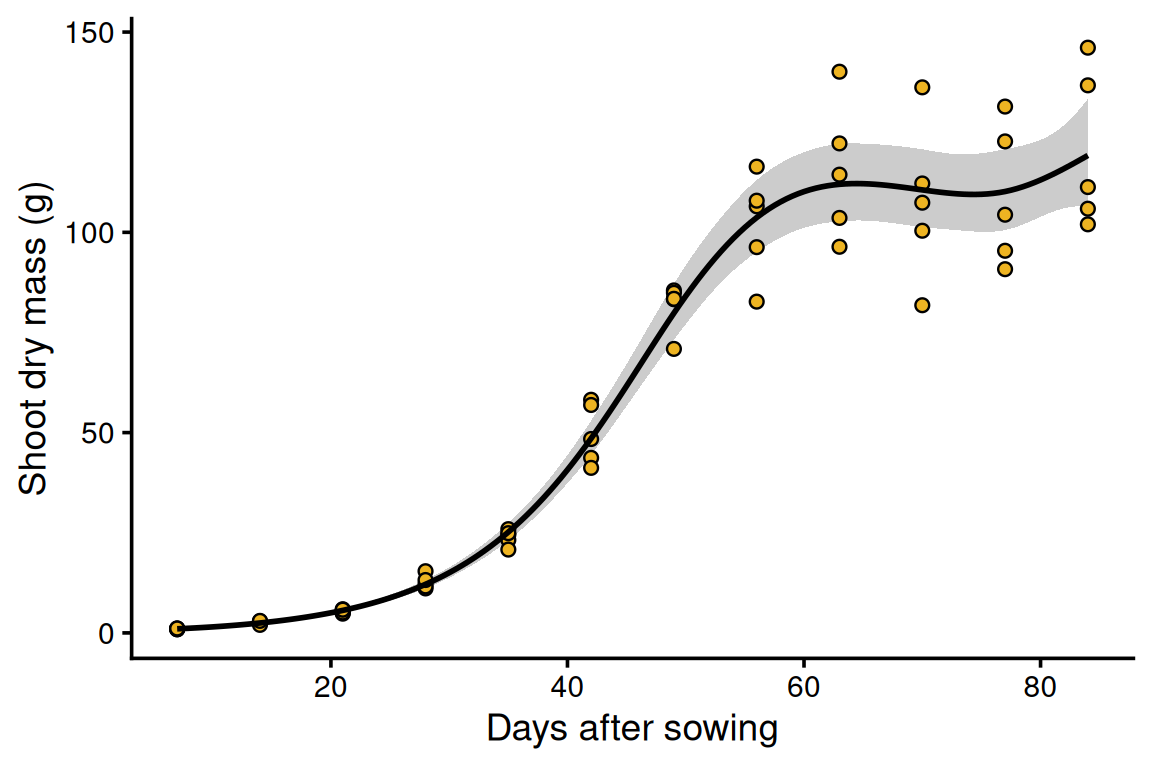
Now you try. Put both varieties on one figure: points, GAM curve and band for each, coloured by variety. Then compare the final sizes: do the 95% confidence intervals for Asym overlap?
g_d <- gam(mass_g ~ s(day), data = dwarf, method = "REML")
grid_g <- data.frame(day = seq(7, 84, by = 0.5), variety = "giant")
grid_d <- data.frame(day = seq(7, 84, by = 0.5), variety = "dwarf")
p_g <- predict(g, newdata = grid_g, se.fit = TRUE)
p_d <- predict(g_d, newdata = grid_d, se.fit = TRUE)
grid_g$fit <- p_g$fit; grid_g$lo <- p_g$fit - 1.96 * p_g$se.fit; grid_g$hi <- p_g$fit + 1.96 * p_g$se.fit
grid_d$fit <- p_d$fit; grid_d$lo <- p_d$fit - 1.96 * p_d$se.fit; grid_d$hi <- p_d$fit + 1.96 * p_d$se.fit
both <- rbind(grid_g, grid_d)

ggplot(sun, aes(x = day, y = mass_g, colour = variety)) +
  geom_ribbon(data = both, aes(x = day, ymin = lo, ymax = hi, fill = variety),
              inherit.aes = FALSE, alpha = 0.2) +
  geom_point() +
  geom_line(data = both, aes(x = day, y = fit, colour = variety), linewidth = 1) +
  labs(x = "Days after sowing", y = "Shoot dry mass (g)", colour = "Variety", fill = "Variety") +
  theme_classic(base_size = 14)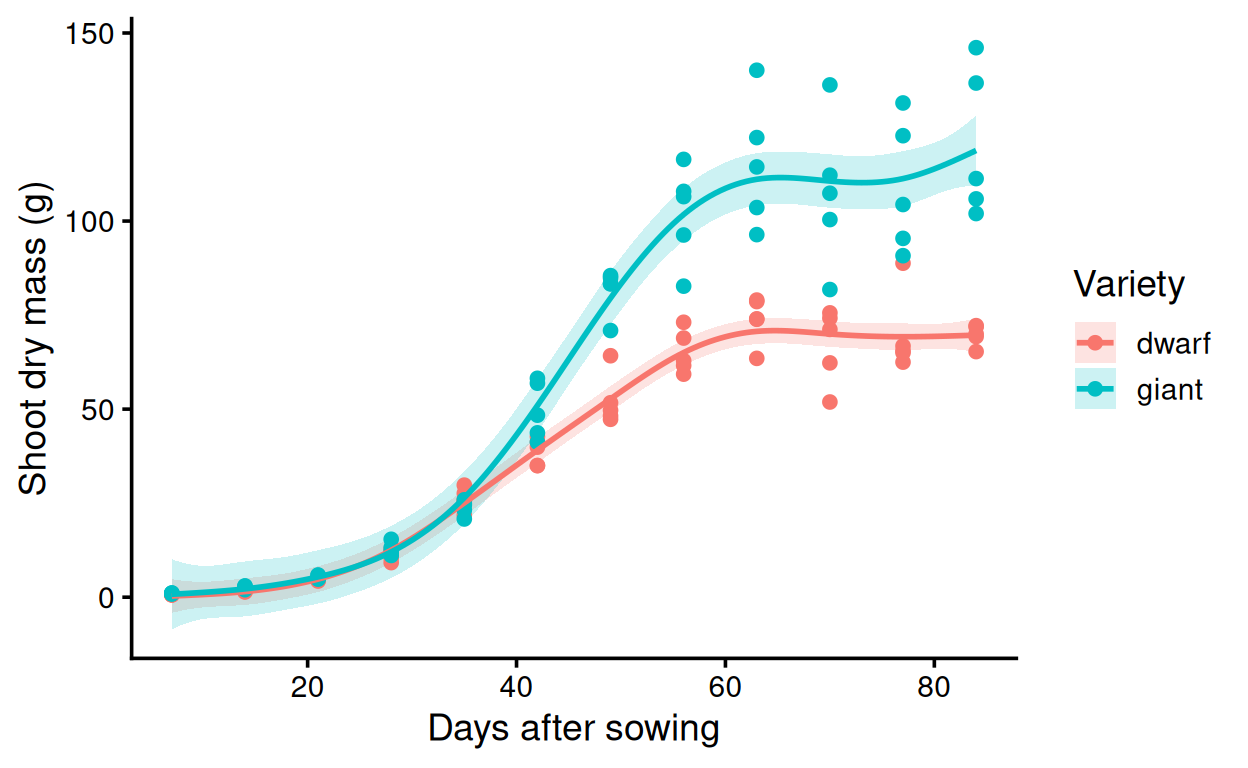
n1_d <- nls(mass_g ~ Asym / (1 + exp((xmid - day) / scal)),
            data = dwarf, start = list(Asym = 70, xmid = 40, scal = 7))
confint(n1)["Asym", ]     # giant: 109.5 to 121.2 g
2.5% 97.5%
109.4911 121.2107 confint(n1_d)["Asym", ] # dwarf: 68.4 to 74.0 g. No overlap: giants end about 44 g heavier 2.5% 97.5%
68.36613 74.01944